Your company knowledge, on your infrastructure.
modAI is an assistant that answers from your company documents. It runs on your own server, shows the document behind every answer, and does not invent what the documents do not say.
English and Turkish interface; English and Turkish documents and questions; a Turkish voice assistant. Separate knowledge bases for HR, Finance, IT and Support. Leave, purchase and expense requests with approval steps. A licence key and an offline installation package on the day you order.
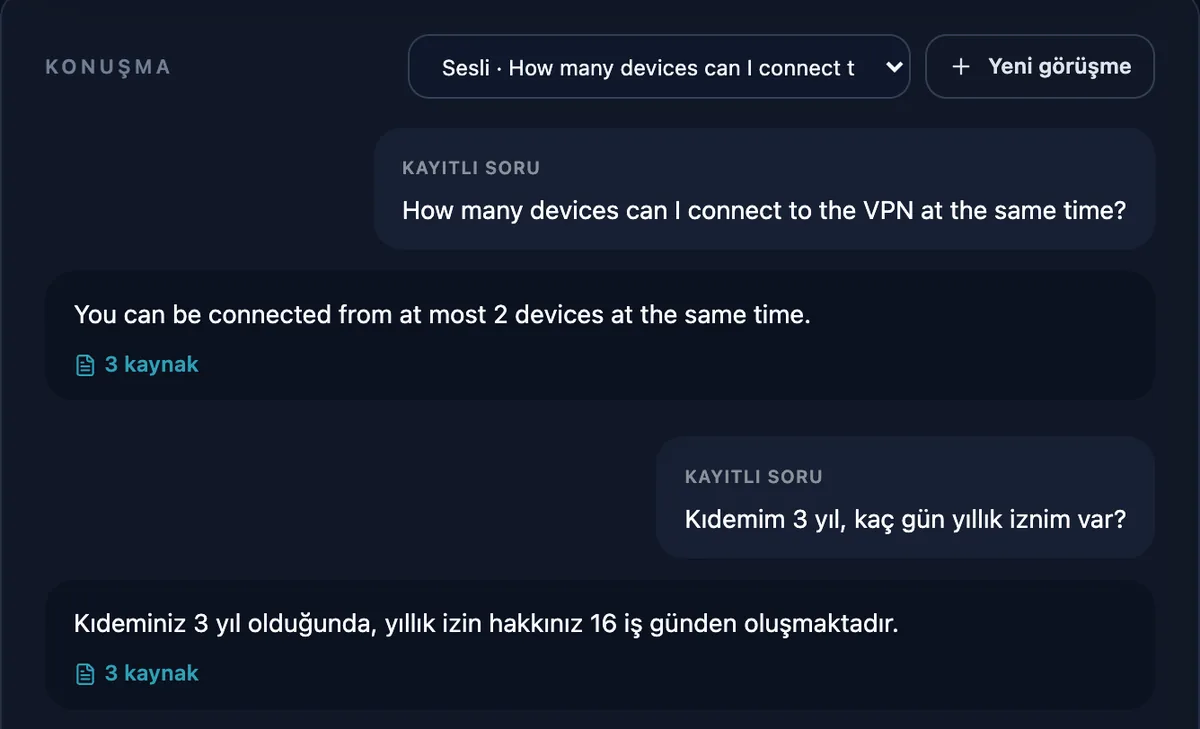
Real system answers: fictional Atlasnova demo documents, test environment, Gemma 3 4B and BGE-M3. The source display is simplified here.
What it does differently
Not a general chatbot. An assistant tied to your company's documents that knows its limits.
- It does the work too, with approvals.
- An employee who writes "I want three days of leave" is offered the leave request, drafted from that sentence. Approvers see the numbers computed from the request ("4 working days of notice") next to the policy's own sentence. Steps move in order, an approver who is away delegates, and waiting steps are reminded. After the last approval the request is sent, signed, to the HR, ERP or ticketing system. Nobody approves their own request; every step is recorded.
- Source: requests (Turkish)
- It says when it does not know.
- If no document in the selected knowledge bases matches the question, the language model is not called at all and the answer says no document was found. Nor does it answer from an unrelated passage: with multilingual search, questions below a measured relevance floor go to the unanswered-questions report. When a value sits exactly on the boundary between two table rows, it does not guess; it points to the document owner.
- Source: security architecture (Turkish)
- Every answer comes with its source.
- The document, section and quote behind the answer appear next to it. Employees check it in one click and can go back to the document before an important decision.
- Source: the enterprise usage guide (Turkish)
- Ask in one language, find it in another.
- Multilingual search (BGE-M3) matches an English question with Turkish policies and a Turkish question with English procedures. The answer comes in the language of the question.
- Source: the multilingual search guide (Turkish)
- Department boundaries apply before search.
- HR, Finance and IT documents live in separate knowledge bases, and everyone searches only where they are authorized. Archived old versions never reach answers.
- Source: roles and knowledge bases (Turkish)
- It reads numbers from the table.
- For questions like “Who approves a 40,000 TL purchase?” the amount is matched to the right table row. Turkish (40.000) and English (40,000) number formats are both read correctly.
- Source: user guide (Turkish)
- Policies do not go stale quietly.
- Every document has an owner and a review date. An answer that relies on an overdue document carries a warning on its source card, and managers see every document waiting for review in one list.
- Source: document owners and reviews (Turkish)
- Quality is measured, not assumed.
- Acceptance questions live on the Quality page and are asked again through the same search and model your users get, nightly if you like. Every run also tries 9 prompt-injection scenarios, instructions hidden in documents, and shows the result as it is; the assurance report exports them as PDF. The unanswered-questions report shows what is missing from your documents, and answers employees mark with a thumbs down point to wrong or outdated ones.
- Source: the acceptance test (Turkish)
- It reads your videos and scanned documents too.
- Training videos and meeting recordings are transcribed minute by minute, and an answer shows the minute it was said. Draft minutes come from a recording: decisions, action items and owners. YouTube videos need no download: paste the transcript or the AI summary. Scanned PDFs and images are read with Turkish text recognition.
- Source: scanned documents, audio and video (Turkish)
- Employees sign in with the company account.
- No separate password: Microsoft Entra ID, Google Workspace or Keycloak over OpenID Connect, or the Active Directory user name and password directly. When someone leaves and their company account is closed, modAI closes with it.
- Source: single sign-on setup (Turkish)
- It runs on your own server.
- Documents, the search index, the language model and the voice models stay on your company's machine. After setup, answering needs no internet connection.
- Source: the installation and handover guide (Turkish)
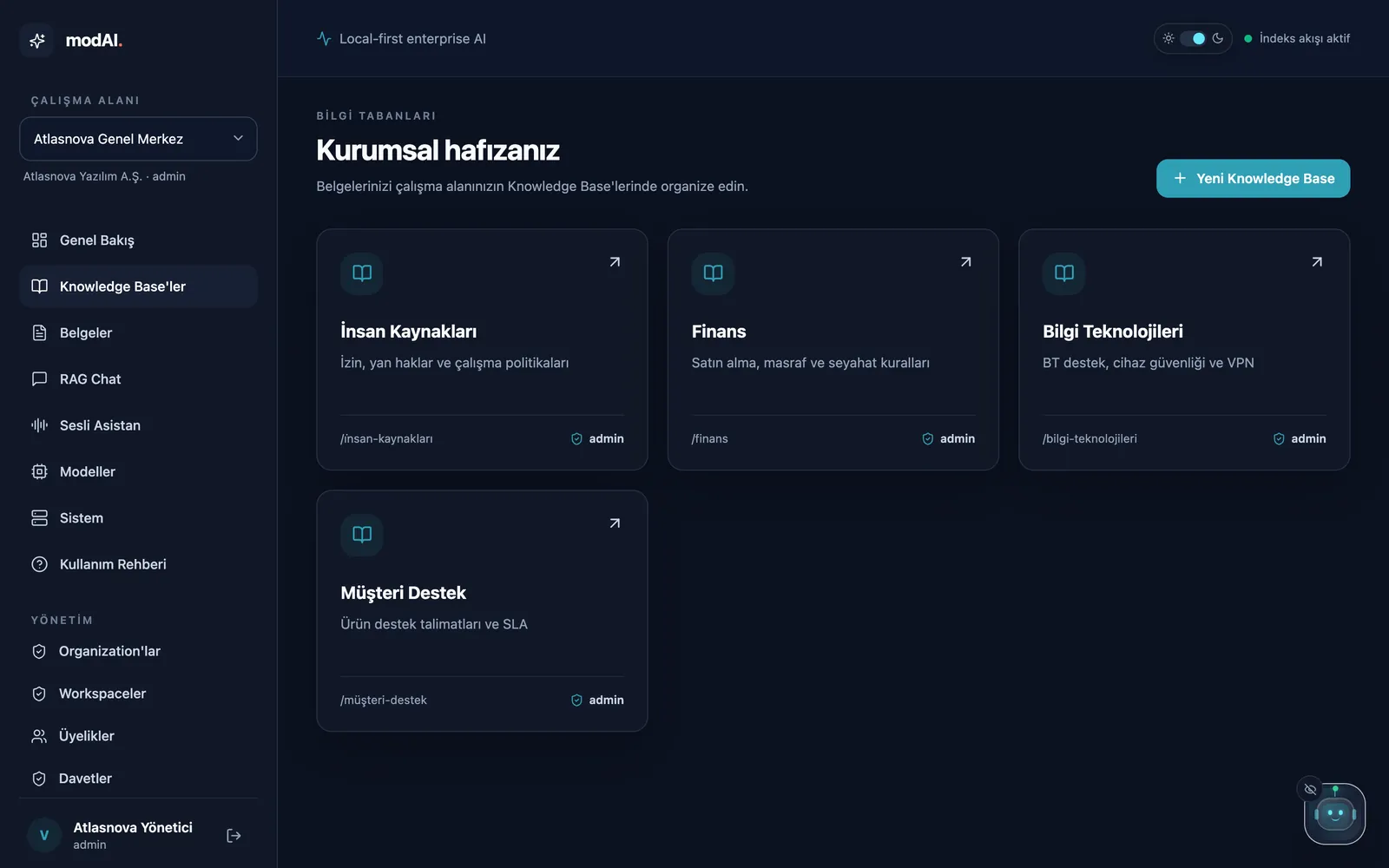
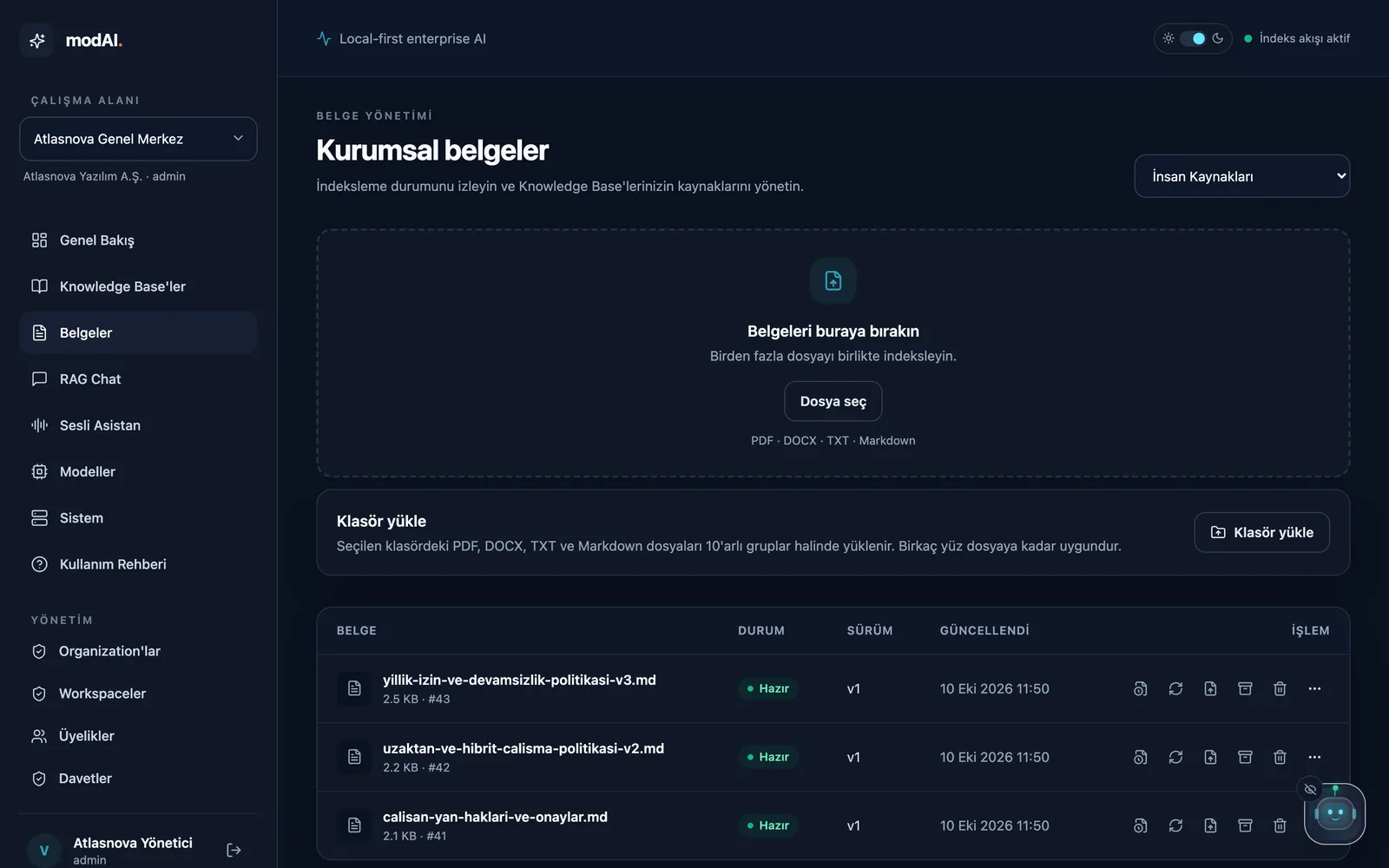
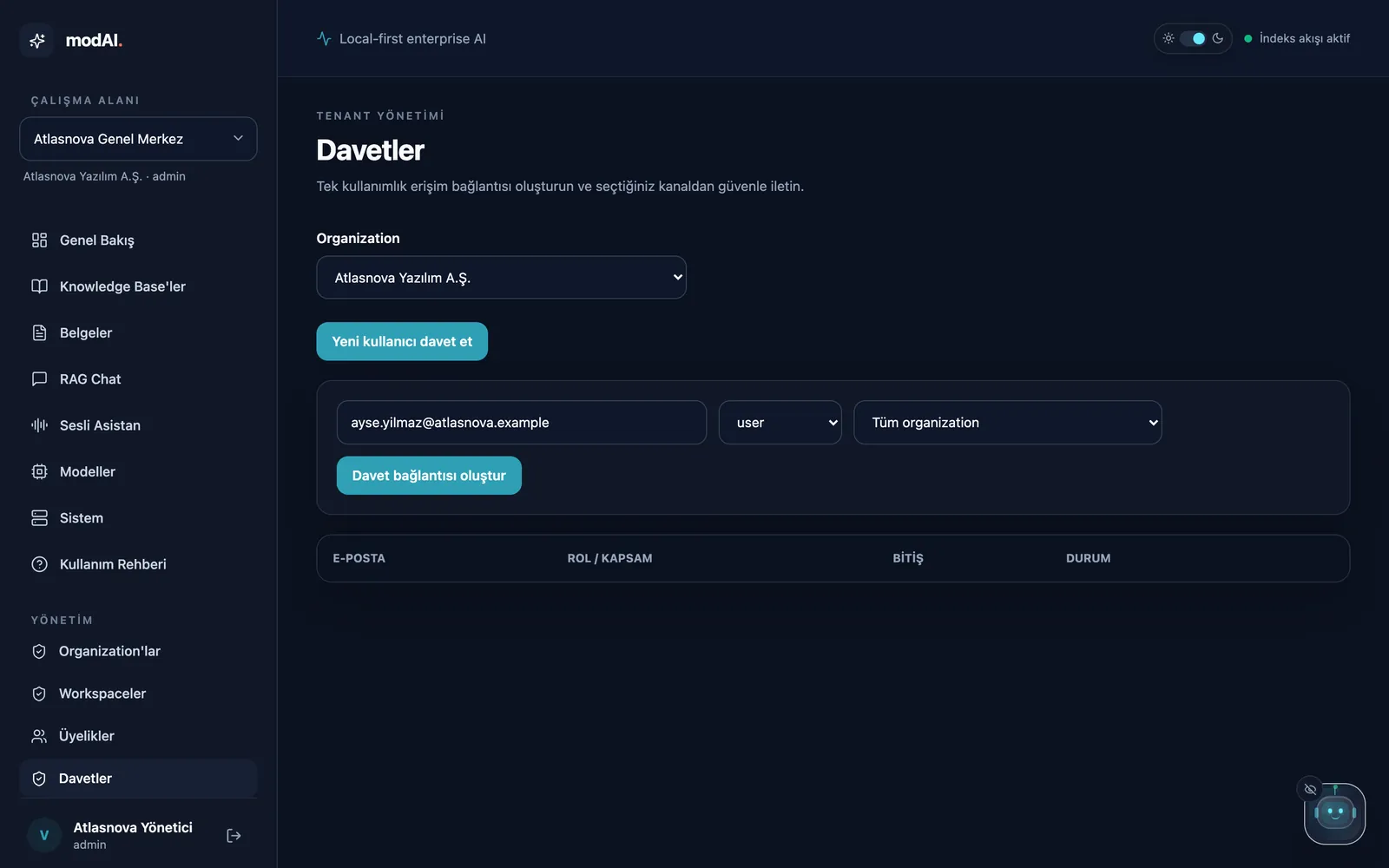
From installation to the first question in four steps.
Screenshots of the product itself, with demo data of the fictional company Atlasnova Yazılım. The screenshots show the Turkish interface; one click switches it to English.

Ask out loud, listen to the answer.
A short path to the same knowledge at a desk or on the floor: say the question, hear the answer in modAI's Turkish voice, see the source on screen.
- Speech is transcribed on your company's own modAI server. The recording never leaves the company and is not kept; recognition can also run entirely in the browser.
- Answers are read aloud by the Turkish neural voice that ships with the product, at an adjustable speed.
- The question is shown before it is sent, so a misheard word can be corrected.
- Work described by voice starts as a request too: an employee who asks for three days off next week is offered the leave request.
- Conversations are kept; leave the page and pick up where you left off.
Where it helps inside a company
The most measurable gain from internal AI is fewer repeated questions and less time spent searching. modAI does this from the company's own documents, with sources.
- HR policy questions
- Leave, benefits, remote work, expenses: employees ask directly and the answer comes with the clause. HR answers the same question less often.
- IT helpdesk
- VPN, passwords, a lost laptop and access steps are read from the procedure. The unanswered-questions report shows which guide is missing.
- Training and onboarding
- Onboarding videos and recorded trainings become searchable; a new employee finds where something was explained, down to the minute.
- Customer support teams
- Product instructions, SLAs and escalation rules in one place. Once an old version is archived, answers come only from the current one.
- Finance and purchasing
- Approval limits and spending rules are read from the right table row, so "who approves a 40,000 TL purchase?" is answered from the table, not guessed.
- Quality and audit
- Procedures have an owner and a review date; an answer that relies on an overdue document carries a warning. Every answer is traced to the document versions it used, so when a procedure is corrected you can find the answers that relied on it.
- Meetings
- Upload a meeting recording or notes and get draft minutes: decisions, action items, owners and dates, each with the minute it was said. Edit the draft and save it to a knowledge base, so "when did we decide this?" has an answer.
- Sales and proposals
- Product information, discount policy and contract terms in one place. The sales team reads what to tell a customer from the policy, with its source.
Knowledge stays inside your company.
Documents, the search index, the language model and the voice models run on your company's machine. Employees connect from the browser.
The employee's browser
- Interface and voice assistant
- Turkish voice (EMA Lightning)
- Optional: on-device speech recognition
Your company's server
- modAI: access control, search and indexing
- PostgreSQL: users, documents and audit log
- Qdrant: search index; Valkey: job queue
- Ollama and Gemma 3: answer generation
- BGE-M3: multilingual search
- Whisper Small: speech recognition
No external AI service is used. Documents and questions are not sent to third parties.
- Invitations and roles. Accounts are created by invitation; access is granted by role and scope.
- Department and document boundaries. Search is limited to the knowledge bases a user is authorized for. A file's folder or SharePoint permissions come with the document: only its readers find a restricted document.
- Approved workflows. Leave, purchase, expense and IT access requests: computed numbers next to the policy, four eyes, delegation and reminders, then a signed webhook, a Teams or Slack message and a CSV report.
- Connected sources. A folder on the file server or a SharePoint library stays in line with a knowledge base: new files are added, changed files become new versions, removed files are archived.
- Company sign-in. OpenID Connect with Entra ID, Google Workspace and Keycloak, or Active Directory directly (LDAP); no separate password.
- Audit log. Document uploads, deletions, archiving and permission changes are recorded.
- Answer traces. Each answer records which document versions it used, never the question or the answer text.
- Expert-verified answers. An answer an expert approved is given to the same question without the model; the approval lapses when a source document changes.
- Model choice, tested first. Another local model on the server passes the quality checks and security scenarios before it is activated; documents are not re-indexed.
- Assurance report. Installation, access, retention, quality and security results on one page, saved as PDF for procurement.
- Hidden instructions. Invisible comments and sentences addressed to the AI never reach the model; the Quality page measures this with 9 scenarios.
- HTTPS. A ready HTTPS layer for multi-user network installations.
- Installation, backups and upgrades. One command each to install, back up, upgrade and roll back. Backups are also copied to a second disk and restored with one command.
- modAI Box. A pre-installed appliance: plug it into power and the network, then open it in the browser with the setup code on its label. A watchdog restarts a stuck service.
- Offline installation package. Every release ships as one folder with its images, models and checksums; installation and upgrades run without internet and roll back with one command.
- Enterprise identity. Sign-in with the company account (Entra ID, Okta, Google Workspace, Keycloak) or Active Directory, workspace roles from directory groups and SCIM 2.0 provisioning: someone who leaves is disabled in the directory and can no longer sign in to modAI.
- Model choice with visible licenses. Administrators choose among the local models on the machine (Gemma, Qwen and your own adaptations); each passes the quality and security checks first, and its license is shown.
- Install and forget. Nightly backups run by themselves and are thinned so they never fill the disk; administrators are warned when space runs low, and a capacity card says when to scale up.
- Measured capacity. On a 16 GB machine, 95% of answers within 10 seconds with 4 simultaneous questions; about 250 employees comfortably. The load test runs on the customer's machine too.
- Data protection tools. Personal data export, conversation deletion and account erasure are in the admin console. Data inventory (Turkish)
- Supply chain and security architecture. Every package carries a bill of materials (SBOM, CycloneDX); dependencies are scanned for known vulnerabilities. Security architecture (Turkish)
- Retention. Conversation retention is configurable; IP addresses in the audit log and backups are deleted after six months, and logs are capped in size.
- Licenses. PostgreSQL, Qdrant, Valkey and Ollama are permissively licensed. Third-party notices
Which one fits you?
modAI is not a cheaper ChatGPT. It is control over where company knowledge lives and how it is used.
A general-purpose AI tool may be better if
- you want immediate access to the strongest hosted models,
- you want ready-made sync from cloud sources such as Google Drive or Confluence (modAI syncs network folders and SharePoint; others come by upload or folder import),
- processing your data in a cloud service is acceptable to you.
modAI fits better if
- company documents must not leave the company,
- answers must rest on documents and be verifiable,
- access boundaries between departments matter and should follow the groups of your company directory (Active Directory, Entra ID, Okta, Keycloak) and the files' own permissions,
- you want Turkish and voice use,
- you prefer an annual license to per-user monthly subscriptions.
Side by side with cloud assistants.
Where is company knowledge processed, what happens when the internet goes down, and what does a 250-person company pay per year?
| Topic | modAI | Cloud AI assistants e.g. Microsoft 365 Copilot, ChatGPT Business |
|---|---|---|
| Where documents and questions are processed | On your company's server or the modAI Box | In the provider's cloud |
| When the internet goes down | Keeps working | Stops |
| Pricing model | Fixed annual licence | Monthly subscription per user |
| 250 people, one year | €9,900 (Business) | $60,000 ($20 per user per month) – $90,000 ($30 per user per month, plus a Microsoft 365 licence) |
Included with modAI: answers that show their source and say so when no document covers the question; approved leave, purchase, expense and access requests; a Turkish voice assistant; Active Directory, SSO and SCIM; quality measurement and an assurance report; data protection tools.
Cloud prices are October 2026 list prices (ChatGPT Business annual $20, Microsoft 365 Copilot enterprise annual $30), excluding taxes. Check the provider's current price before buying.
Pricing
Start with a narrow, measurable pilot. Expand once it proves useful on your real documents.
Pilot
€2,900 one-time
A 2–4 week validation with selected company documents and a limited user group.
- 30-day licence, 25 users
- Private pilot installed at your company
- 1–2 knowledge bases, selected documents
- Role-based pilot access
- Local AI configuration
- Acceptance test for source-backed answers
- Findings and rollout recommendation
- Credited against the first annual licence
Business Recommended
€9,900 per year
For a team or business unit that wants a supported private knowledge assistant.
- Annual licence, up to 250 users
- Production installation on your own server
- Multiple workspaces and knowledge bases
- Role-based user access
- Source-backed answers and the voice assistant
- Standard installation and update guidance
- Business support channel
Enterprise
€19,900+ per year
For broader deployments that need custom scope, integration work or installation support.
- Everything in Business; number of users by contract
- Multi-team deployment scope
- Custom infrastructure planning
- Custom workflow and integration work
- Model and search configuration support
- Priority implementation support; custom SLA and commercial terms
Prices exclude taxes, dedicated hardware and third-party model or API fees. Custom integrations, SAML, high-availability architecture, certifications and customer-specific compliance work are not included unless explicitly scoped in a commercial agreement. Commercial license terms
Order today, running today.
Order, licence key and installation on the same day. Moving to the annual licence needs no reinstallation; your documents and settings stay where they are.
- 20-minute demoLive or on video. Bring your own questions.
- Pilot orderA one-page order form, signed electronically. Pay by bank transfer.
- Licence and package the same dayThe licence key and the installation package arrive by e-mail. Or the modAI Box arrives installed.
- One-hour setupThe package installs offline; the key is pasted into the Licence screen. We set up the first knowledge base and ask the first questions together.
- Annual licencePaste the new key and that is it. The pilot fee is credited against the first year.
Outside Turkey
- Invoice in euros, payment by bank transfer (SWIFT).
- Setup session in English; answers come in the language of the question.
- The console is in English and Turkish; each user picks the language.
- Packages for Apple silicon, ARM and x86_64 servers.
In Turkey
- Prices in euros; invoiced in Turkish lira at the Central Bank selling rate of the invoice date.
- e-Invoice; bank transfer or a card payment link.
- Setup and support in Turkish.
Order a pilot info@wearetheartmakers.com · +90 505 314 9360
Questions
How soon can we start?
On the day you order. The licence key and the installation package arrive the same day; the package installs offline (80 seconds in our measurement) and in a one-hour session you ask questions about your first knowledge base. The modAI Box arrives installed.
How does the licence key work? Does it need the internet?
WATAM signs the key; your installation verifies it by itself, without going online. There is no licence server. The key carries the licensee, plan, end date and number of users. A renewal is a new key pasted into the console; administrators are warned before the end date, and a 14-day grace period follows it.
Do you provide the source code?
No. modAI is proprietary software licensed for use. The installation package contains the application as container images. For security reviews we provide the security architecture document and a software bill of materials (SBOM); a supervised code review under a non-disclosure agreement can be arranged if needed.
Does it replace ChatGPT, Claude or Copilot?
No. modAI is the answer layer for company knowledge: access boundaries, deployment control and source-backed answers. Teams can keep using those tools for general writing and research.
What hardware does it need?
A Mac or Linux server that runs Docker and Ollama, with at least 16 GB of memory; 32 GB is recommended. Our measurements are from an Apple M1 Pro with 16 GB. The language model (Gemma 3 4B) uses about 4–4.6 GB and multilingual search about 2 GB.
Does it need an internet connection?
No. The installation package includes the models; installation, upgrades and licence checks work offline. Search and answering run inside your company network; documents and questions are not sent out.
Which documents can be uploaded?
PDF, DOCX, TXT and Markdown; DOCX tables are kept. Scanned PDFs and images (PNG, JPG, TIFF) are read with Turkish and English text recognition. Audio and video recordings, such as company videos downloaded from YouTube Studio, are transcribed minute by minute, and a source shows the minute an answer was said. All of it is processed on your own server.
Do old and new versions of a document get mixed up?
An updated document is uploaded as a new version with “Replace document”. An old policy can be archived; archived documents are never used in answers and can be restored.
Do you claim SSO, certifications or high availability?
Shipped with the product: single sign-on with the company account (OpenID Connect: Microsoft Entra ID, Google Workspace, Keycloak, Okta), Active Directory sign-in (LDAP), SCIM 2.0 provisioning and HTTPS for network installations. SAML and high availability are scoped as separate project work. There is no automatic failover; a second machine can stand by warm and take over in minutes, and restore drills prove the backups. An independent penetration test is planned; every release runs an automated authentication sweep; the safeguards and the gaps are in the security architecture guide (Turkish). We do not claim a security certification (ISO 27001, SOC 2).
Does the price include hardware?
No. Servers, GPUs, storage and third-party model or API charges are excluded unless explicitly included in a project scope.
Why start with a paid pilot?
A pilot measures answer quality, access design and deployment fit on your real documents before a larger rollout. The result is made concrete with an acceptance test built from questions we prepare together.
A 2–4 week pilot with your own documents.
One department, selected documents and a small user group. We measure the result with questions we prepare together.